- √ No AdWare
- √ No watermarks
- √ No Trojans/Viruses
- √ JUST FREE
How to Create an MP4 Slideshow from Photos
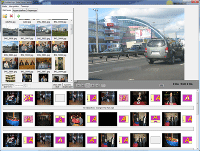
MP4 is the most universal video format today. Phones, TVs, YouTube, Facebook and messengers play MP4 without extra codecs. With Bolide Slideshow Creator you can turn a folder of JPEG and PNG photos into a smooth MP4 slideshow with background music, transitions and optional text captions — completely free and without a watermark.
The program is made for Windows 7/8/10/11. You do not need video-editing experience: drag photos to the timeline, add a music track, pick transition effects and click Save as video file.
Why save a slideshow as MP4?
- YouTube and social media — MP4 is the default upload format
- Smartphones and tablets — easy to send via WhatsApp, Telegram or email
- Modern TVs — play from USB stick or home network
- Smaller file size than uncompressed AVI while keeping good quality up to Full HD (1920×1080)
Steps to make an MP4 slideshow
- Download and install Bolide Slideshow Creator.
- Add photos in the order you want them to appear.
- Add an MP3 or other supported music file for the soundtrack. See our guide on royalty-free music for slideshows.
- Choose transition effects (or let the program assign them automatically).
- Select MP4 as the output format, set resolution and save the video.
Need a step-by-step walkthrough? Read how to make a slideshow video or check the FAQ.
Bolide Slideshow Creator also exports MKV, AVI, WMV and FLV if you need another format.
Download Free MP4 Slideshow Maker
Ready to turn your photos into an MP4 video? Download Bolide Slideshow Creator now — it is 100% freeware. FREE DOWNLOAD